For you and your team
Everything that brings money in and keeps the business running.
- Invoices, quotations and payments
- Collections and reminders
- Books, stock and payroll
- Cash forecast for the next 13 weeks
Get paid on time. Run the rest from one place.
GST invoices, WhatsApp and call reminders, stock, books and payroll in one workspace for Indian businesses. It works with Tally, and your CA works here too.
14-day Growth trial. Every feature is marked Live or Coming soon.
One workspace for the money side of your business.
Everything below is labelled honestly. Live means you can use it today, and a “You’ll need” note says when it depends on an account of your own.
Know who owes what, remind them the way they actually respond, and keep a record of every promise.
A to-do list of who to follow up today, in priority order, with the reason for each: how overdue, how much, and what they promised last time.
Ageing by customer, who to follow up today, promises to pay, part-payment plans and disputes, in one place.
Approved reminder templates with the amount and due date. Replies land in your inbox, and a customer who sends STOP is not messaged again.
You’ll need: Your own number on the WhatsApp Business Platform (Cloud API). Until you connect one, WhatsApp runs in a sandbox and nothing reaches customers.
WhatsApp reminder rulesAn automated call: press 1 for a payment link, 2 to promise a date, 3 to talk to your staff. Calls go out only inside your calling window, with a weekly limit per customer.
You’ll need: Your own Twilio, Plivo or Exotel account. Without one, calls are simulated in a sandbox.
How reminder calls workSend a customer a private link to see their statement and raise a dispute, without creating an account.
Orders from your WhatsApp store come with a UPI link that pays straight to your own UPI ID.
Each invoice gets its own public page with a Pay button. Razorpay pay-by-link, marked paid in your books when the payment is confirmed.
You’ll need: Your own Razorpay account, connected in settings.
Rules that send the next reminder when an invoice crosses a set number of days overdue. On the Growth and Scale plans.
When a debt turns serious, every contact is on record, evidence is kept unaltered, and you can hand the matter to your advocate.
Quote, bill and sell from one place, and keep in touch with customers on the channels they already use.
Tax invoices with CGST and SGST or IGST worked out from the place of supply, numbered by financial year. Quotations turn into invoices, and recurring invoices raise themselves.
GST invoice checklistCustomers open the quotation, accept and sign it, and pay an advance, all from one link.
A page for your business with contact details and products at live prices and stock. Customers order on WhatsApp and pay by UPI, and every enquiry becomes a lead.
One shared inbox, broadcasts to contacts who opted in, auto-replies and simple chat flows. Optional AI replies answer only from notes you write, and stay off until you switch them on.
You’ll need: Your own WhatsApp Business Platform number, as above.
Plan posts on a calendar with festival ideas. Publish to your Facebook Page, Instagram, LinkedIn, X and Google Business Profile, or copy and post by hand, including to WhatsApp Status.
You’ll need: Connecting an account needs an access token from that network today. One-click connect is coming.
Single-use coupons, gift cards and a prepaid customer wallet, with gift card balances kept in your books as money owed to customers.
Leads from WhatsApp and store enquiries in one list, and a board that shows every deal by stage.
Enquiry forms you embed on your own site that create leads, with duplicates caught.
Campaigns with link tracking and unsubscribe handled for you. They go only to contacts who have given marketing consent.
Let customers book a slot from your business card.
The back office, connected, so a sale, a payment and a salary each land in the right place once.
Double-entry ledgers, day book, trial balance, profit and loss, balance sheet and cash flow. A small connector app keeps them in sync with Tally.
Tally and MunshijiRecord what comes in and goes out, by category, straight into the books.
Import bank statements and match lines to invoices and bills automatically, with rules for the rest.
Inventory across outlets, purchase orders, transfers, stock counts and a billing counter. Reorder suggestions tell you what to buy, and from whom.
Record supplier bills with input tax credit eligibility, and match them against GSTR-2B so you can see which credits your suppliers have reported.
TDS and TCS worked out by section, threshold and PAN, with registers for your CA, and advance tax instalments with interest estimates.
Salaries with PF, ESI, professional tax and TDS under the new regime worked out, and printable payslips.
Task boards for each project, time logged against them, and unbilled time turned into a draft invoice.
What is due and who owns it, with GSTR-1 and GSTR-3B drafts built from your invoices. Filing stays with you or your CA.
Thirteen weeks of cash ahead, budgets against actuals, loans, insurance renewals and a loan-readiness check.
Leave requests and holidays, check-in from the phone or a shared kiosk, and staff expense claims with approvals.
Live
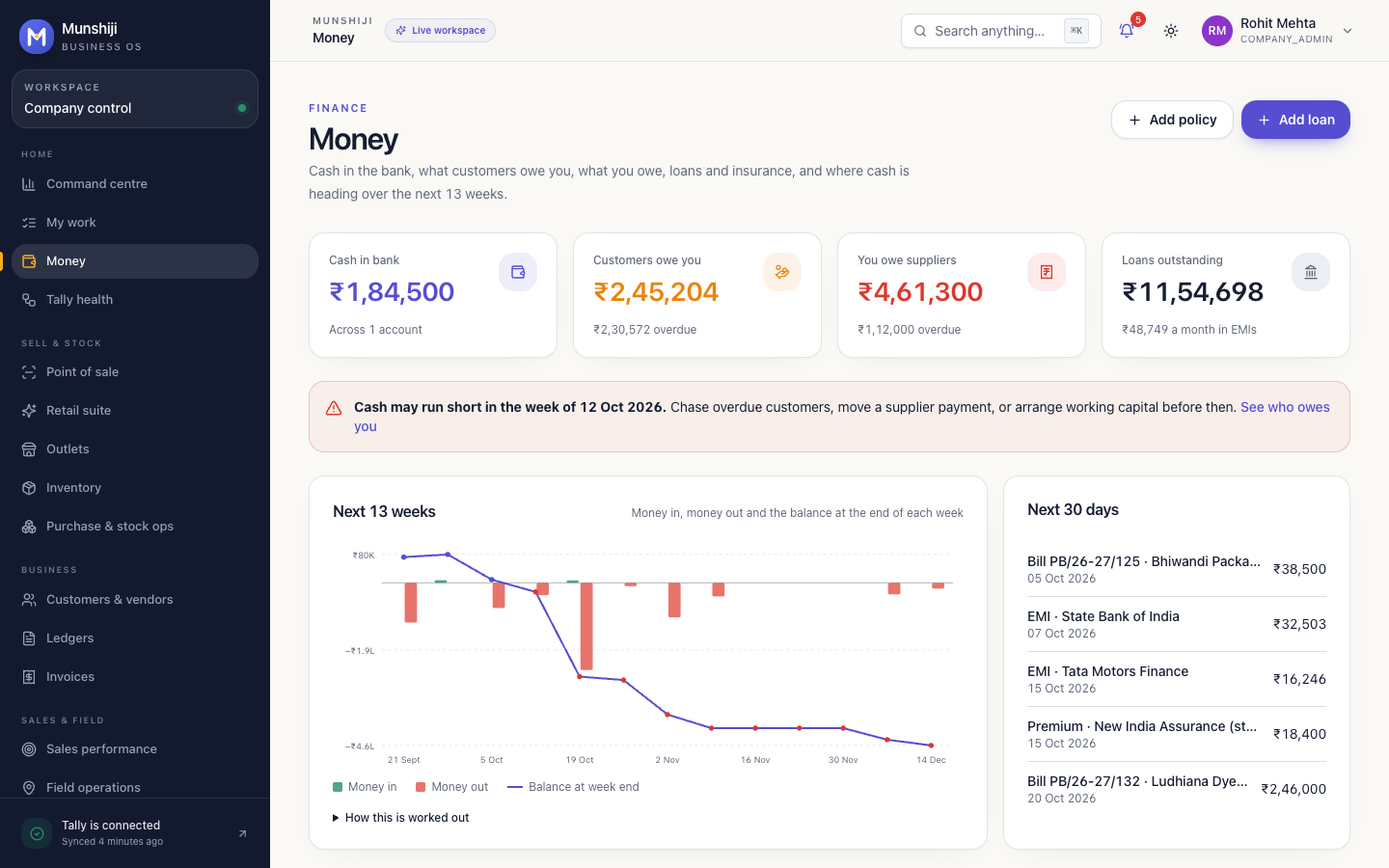
Money brings what customers owe you, what you owe suppliers, loans and insurance into one view, then works out the weeks ahead from your own invoices.
Confirm a bank balance once. Statement lines you import after that date keep it current.
Customer invoices coming in, supplier bills, EMIs and premiums going out, week by week.
If the balance could dip below zero, you see which week, with time to chase dues or move a payment.
What is still owed on each loan, the next EMI, and every renewal 30 days before it is due.
You run the business in yours. Your CA runs their practice in theirs. The same numbers sit underneath both.
Everything that brings money in and keeps the business running.
Your CA’s team prepares and reviews from the records you already keep here.
Both workspaces are live today. Filing and payments always wait for a person to approve them. How sharing with your CA works
No more chasing each other for last month’s sales register. Your CA sees what you allow, prepares from your books, and you both see what is due.
CA firm? Sign in to your firm workspaceChoose the areas your CA can see, such as GST or TDS, and until when. Withdraw access any time.
Your CA’s team prepares from the invoices and books already here, not from spreadsheets sent back and forth.
Upload statements and bills once. Your CA sees what you share, in the areas you allow, and can add what they collect.
Send bills and statements the way you already do. Each file lands against the right request.
14 days before
The return is planned and given to a named person at your CA firm, two weeks ahead.
12 days before
You get a single list of what is needed. The assistant drafts it and your CA checks it first.
7 days before
Sales, purchases and tax totals are added up from your own invoices, then reviewed by your CA.
3 days before
Your CA files on the portal once you share the OTP. Nothing is filed without them.
Due date
The acknowledgement number is recorded against the return, and you are told it is done.
You don’t have to change how your accountant keeps the books. Munshiji reads them, and adds billing, collections and cash planning on top.
A small Windows app on your office PC keeps the books in sync.
Connect once, with your permission.
For everything that arrives as a file.
GST portal. Returns, e-invoices and e-way bills through a licensed GST Suvidha Provider, with your OTP consent. In development
Financial data is sensitive. The controls are built in, not bolted on.
Every plan includes GST invoicing, collections, stock, books, bank, the cash forecast and working with your CA. Plans differ in users, volumes and automation.
For small businesses bringing billing, stock and collections together.
₹999
per month
For growing businesses that need automation and reporting.
₹2,999
per month
For businesses that need more capacity and two-way Tally.
₹7,999
per month
Every account starts with a 14-day trial of Growth. Choose any plan from Plan & billing inside the app, and pay by UPI, card or net banking. Prices are before GST. WhatsApp and call allowances are how many the app will send; they need your own WhatsApp Business Platform number and your own Twilio, Plivo or Exotel account, and those providers bill their own charges to you.
We would rather show you the plan than oversell it. Early customers help decide the order.
Plain-English explainers and templates you can use today, whether or not you use Munshiji.
Have a different question? We’re happy to talk
One workspace for running an Indian business: GST invoices and quotations, collections with WhatsApp and call reminders, stock and point of sale, books, bank, payroll, projects and a cash forecast. Your CA can work in the same place, on the areas you choose to share.
No, and it does not need to. Keep Tally for your books if you and your CA like it. A small connector app on your office PC keeps Munshiji in sync with TallyPrime or Tally.ERP 9, one company per install today. On the Scale plan, invoices raised in Munshiji can be pushed back into Tally.
Your own business number on the WhatsApp Business Platform (the Cloud API from Meta), connected in settings. Until you connect one, WhatsApp runs in a sandbox so you can try it, and nothing reaches customers. Meta charges for template messages and bills those charges to your WhatsApp Business account.
Message only customers who have agreed to hear from you on WhatsApp. The first message you send, and any message after 24 hours of silence from the customer, must use a template that Meta has approved. When a customer writes to you, you can reply freely for the next 24 hours. If a customer sends STOP, Munshiji stops messaging them until they send START.
Only inside the calling window you set. By default no call is placed before 9 am or after 9 pm IST, and there is a weekly limit on calls to each customer. For payment reminders we suggest daytime hours on working days. Calls need your own Twilio, Plivo or Exotel account; without one they are simulated. If you record calls, tell customers the call may be recorded.
Everyone signs in with their own login, roles decide who sees money, stock and customers, and changes are written to an audit trail. Keys for WhatsApp, calling and social accounts are stored encrypted. Your CA sees only the areas you grant, until the date you choose. AI replies are off unless you switch them on, and when on, the message text goes to the AI provider you pick. Two-step sign-in and hosting in India are planned before general launch.
No software can promise that. Munshiji makes follow-up regular, polite and on record: who was reminded, how, when, and what they promised. What customers do is still up to them.
No. Munshiji builds GSTR-1 and GSTR-3B drafts from your invoices and keeps the due dates, but filing stays with you or your CA. Live connection to the GST portal through a licensed provider is in development.
You invite your CA firm and choose which areas they can see, such as GST or TDS, and for how long. They prepare from the invoices and books already here, in their own workspace, and you can withdraw access at any time.
TallyPrime and Tally.ERP 9 today, plus bank statement imports. BUSY, Marg, Zoho Books, ERPNext and Odoo are planned, along with Tally XML exports, which covers Vyapar and myBillBook.
Yes. Add employees with their salary structure and Munshiji works out PF, ESI, professional tax and TDS under the new tax regime each month. You approve the payroll, print payslips, and see what is due to EPFO, ESIC and the tax department.
Sign up for the 14-day Growth trial. For Growth or Scale, or help moving your data across, write to us and we will set it up with you.
Choosing a plan, moving across from spreadsheets, or connecting WhatsApp and calling? We’d like to hear from you.
hello@munshiji.inFor product questions, setup and plan enquiries.
Loading enquiry form…